
Shared Hosting Responsibilities for cPanel and DirectAdmin
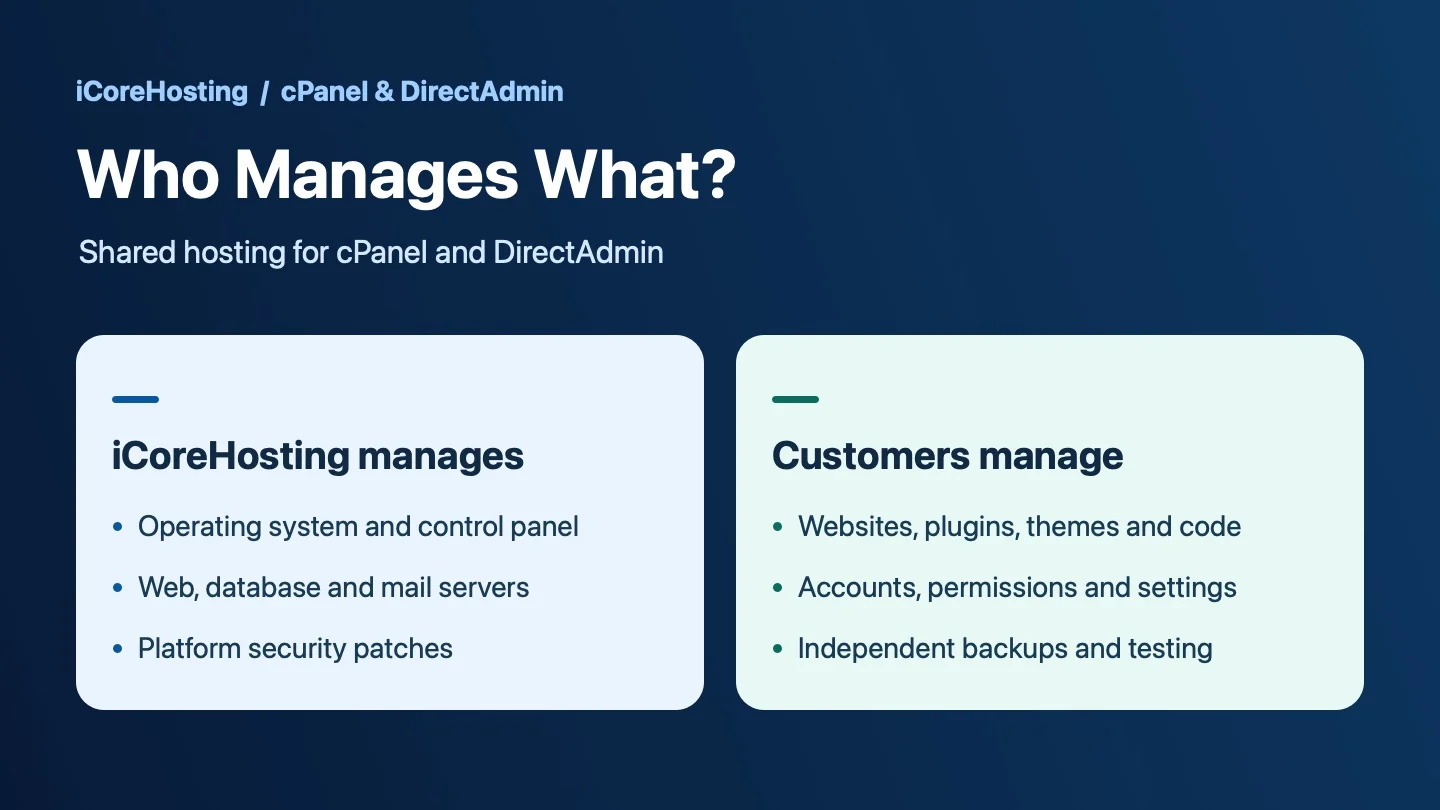
iCoreHosting maintains the shared hosting platform. You maintain the websites and applications in your account. This guide applies to all iCoreHosting cPanel and DirectAdmin shared hosting plans. Additional managed services follow the scope agreed in writing.
Hosting Platform and Security Updates
iCoreHosting maintains the shared hosting infrastructure and the services it manages, including the operating system, control panel, web server, PHP runtime, MySQL or MariaDB, mail server and webmail. We monitor vendor security advisories, assess whether our servers are affected, and prioritise fixes based on risk and impact. We verify and deploy applicable security patches as soon as practicable. We verify the result after deployment. A vendor may apply a security fix to the installed version without changing its major version. If a patch is unavailable or cannot yet be deployed, we may block malicious requests, restrict an affected feature or isolate a service while we work towards a permanent fix.
Customers manage the software and settings within their hosting accounts. Where the control panel lets you select a PHP version, choose a supported version compatible with your website and test your website after changing it.
Websites, Applications and Account Access
iCoreHosting provides the hosting environment and helps investigate issues affecting the platform, such as web server availability, a database service outage or account resource limits.
Customers manage website setup, content, databases, custom code and integrations. Follow security notices for your software and update the CMS, themes, plugins, frameworks and other dependencies. Test changes on a staging site where available. Manage passwords, enable multifactor authentication where available and remove access when staff or vendors no longer need it. This also applies to software installed through cPanel or DirectAdmin, or preinstalled by iCoreHosting, unless a written maintenance agreement covers it.
WordPress and hosting support responsibilities
Email, Domains, DNS and SSL
iCoreHosting maintains the mail, webmail, DNS and certificate services it provides under the hosting plan. Support can help investigate issues in those services and explain the settings required to use them.
Customers manage their mailboxes, passwords, forwarding rules, device settings and mailbox usage. Keep domain registration details and renewal contacts current. Maintain DNS records where you control DNS, and coordinate changes with external DNS or email providers where applicable. For SSL certificates you manage, arrange renewal and installation before expiry. If your plan includes automatic SSL, keep the domain configured so validation can succeed.
Backups and Restoration
iCoreHosting provides the backup and restoration services included in the subscribed plan. Backup scope, frequency, retention and restore options depend on that plan.
Customers keep independent, restorable copies of important website files, databases and email as applicable, especially before updates, migrations or deletions. Check that you can retrieve those copies when needed. When requesting a restore, specify the affected domain, data and preferred restore point. Confirm which current data a restore may overwrite.
Resource Limits and Acceptable Use
iCoreHosting monitors the shared environment to protect service stability. If an account creates a security risk, exceeds applicable limits or disrupts other accounts, we may apply restrictions in accordance with the service terms and acceptable use policy.
Customers monitor their account usage, including storage, bandwidth, mail and processing resources, within the limits of their plan. Keep websites, scheduled tasks and scripts within those limits. Ensure that anyone using your account follows the applicable usage policies.
Maintenance Notices and Incidents
iCoreHosting normally handles routine platform updates and security patches without sending individual notices for every vulnerability or maintenance task. If we expect a significant service interruption, an important feature restriction or action from customers, we notify affected customers in accordance with the applicable service terms and service level agreement. In urgent cases we may take protective action first and communicate the impact and any action required as soon as practicable.
Report suspected compromise or unexpected service issues promptly. Include the affected domain, when the problem started, the error message and any relevant screenshots or logs. Each party follows the incident notification obligations applicable to its role under the law and any relevant contract.
Billing, Renewals and Service Changes
iCoreHosting handles billing and processes renewals and service requests in line with the relevant plan terms and verification requirements.
Customers keep billing and technical contact details current, monitor expiry dates and arrange timely payment. Submit any required payment confirmation and request upgrades, migrations or cancellations early enough for processing. Back up any data you need before cancelling or allowing a service to expire. Suspension, termination and data retention follow the applicable service terms.
Responsibility for Losses and Service Credits
Customers are responsible for losses caused by their failure to maintain or secure the websites, applications or accounts they control, subject to applicable terms and law. For issues involving the shared hosting platform, responsibility, service credits, compensation and any applicable limits are governed by the service terms, the applicable service level agreement and the law.
iCoreHosting Terms and Policies · Contact iCoreHosting Support
Frequently Asked Questions
Do I still need to update WordPress after iCoreHosting patches the server?
Yes. Platform updates fix server components. Update WordPress core, themes and plugins to address issues in your website software, including if it was preinstalled with your plan.
What should I do if my website stops working after an update?
Open a support ticket with the domain, affected feature, when it started and the error message. iCoreHosting can check the hosting platform. Ask your website maintainer to investigate any website code or compatibility issues.
Last reviewed 22 November 2026